Life Summarized:

My photo
Hey! My name is Justin and I am married to my ridiculously awesome wife Jules. We are youth pastors at Christ Church of Orlando. Life, up 'til now is golden. Not only am I the student pastor of identity student ministries but I am also the worship leader at our church, the graphics and web designer and I run a photography business called J.Mikl Photography (www.jmikl.com). This isn't the only site I maintain. I have a youth site, a college site, a church site, and a photography business to manage. But that's enough of that. I love my life, my job, and my youth. I must say that I have one of the most time consuming jobs but I also have the best job in the whole world. We can't wait to see what God has in store for us and our quickly growing family. Someone once told me, "You gotta think BIG, dream BIG, and plan HUGE!"...they are words I now live by...
Showing posts with label Technology. Show all posts

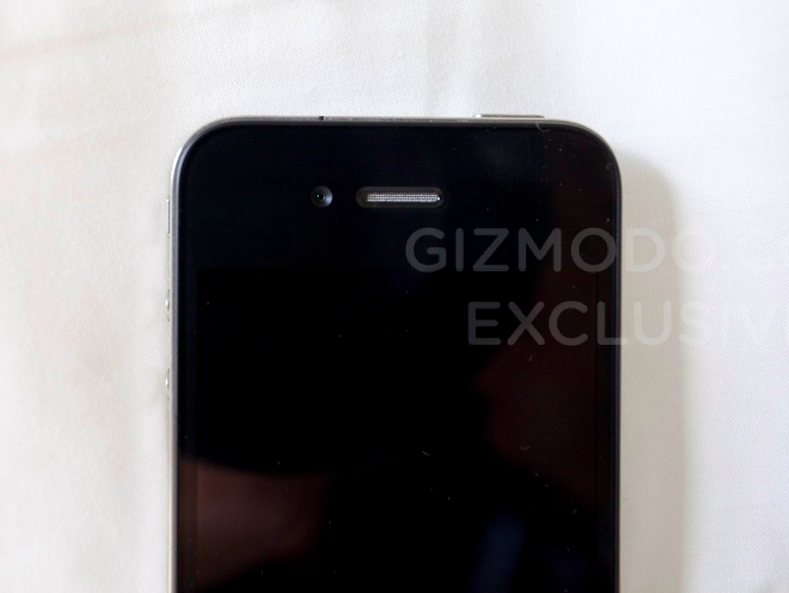
The "NEXT" iPhone


It's been quite a while since my last post. I've kind of fallen of the blogger wheel but I couldn't help to post about the latest breaking news concerning the "NEXT" generation of the iPhone. Here is a re-post of another fellow blogger and lover of all things technology.


You are looking at Apple's "NEXT" iPhone. It was found lost in a bar in Redwood City, camouflaged to look like an iPhone 3GS. We got it. We disassembled it. It's the real thing, and here are some of the details. For more in depth investigation of the "NEXT" iPhone visit Gizmodo.com.

Click Images To Enlarge


While Apple may tinker with the final packaging and design of the final phone, it's clear that the features in this lost-and-found next-generation iPhone are drastically new and drastically different from what came before. Here's the detailed list of our findings:

What's new

• Front-facing video chat camera
• Improved regular back-camera (the lens is quite noticeably larger than the iPhone 3GS)
• Camera flash
• Micro-SIM instead of standard SIM (like the iPad)
• Improved display. It's unclear if it's the 960x640 display thrown around before—it certainly looks like it, with the "Connect to iTunes" screen displaying much higher resolution than on a 3GS.
• What looks to be a secondary mic for noise cancellation, at the top, next to the headphone jack
• Split buttons for volume
• Power, mute, and volume buttons are all metallic


What's changed

• The back is entirely flat, made of either glass (more likely) or ceramic or shiny plastic in order for the cell signal to poke through. Tapping on the back makes a more hollow and higher pitched sound compared to tapping on the glass on the front/screen, but that could just be the orientation of components inside making for a different sound

• An aluminum border going completely around the outside
• Slightly smaller screen than the 3GS (but seemingly higher resolution)

• Everything is more squared off
• 3 grams heavier

• 16% Larger battery
• Internals components are shrunken, miniaturized and reduced to make room for the larger battery


Click Images To Enlarge


As you can see, there are some considerable differences between this "NEW" iPhone and it's previous model; both physically and internally.

Selling my G5...

Well, I am looking to sell my PowerMac G5. It has been a great computer to me and has been such a great help in all my video editing projects and graphics design work. It is an outstanding computer but I am ready to let go of it and down size a bit. So if any of you are out there looking for a good machine....CHECK IT OUT! If you are interested...leave me a comment or send me a message via Facebook.

System Specs:
Apple PowerMac G5
OSX 10.4.11
Dual Core 2.0 GHz Processor
512 MB DDR Ram (8 slots available and only 2 being used)
150GB HD
Wireless Airport
CD/DVD burner
Wireless Bluetooth Keyboard
17" Apple Cinema Display

SOFTWARE Also Included:
Adobe Creative Suite
Microsoft Office
DVD Studio Pro
Final Cut Pro HD Studio
Fast DVD Copy
iLife '08
Stuffit Expander Deluxe
and much more...

Click on any of the images below to get a closer view


FoleyPro 2.04 - Audio Bed Producer

Recently our staff at CCO attended the Drive Conference at North Point Church in Alpharetta, GA and one of the sessions that I gleaned so much from was North Point's student ministry Q & A and Showcase "Inside Out." Inside Out is the high school ministry at NPC and to just sit and watch how others do youth ministry and then to get the opportunity to sit and ask the leaders questions was so helpful and informative.


One of the resources that I took away from that session was the audio software program FoleyPro Version 2.04 for Macintosh OSX and Microsoft Windows. FoleyPro is a software designed to help make your productions and events run smoother by giving you more control over your music beds, bumpers, soundFX and Performance Tracks. I'm sure you have been frustrated with 'CD, MD, & iPod player' lag? I'm sure your services/shows have not been as tight as you would like? I'm sure your volunteers sometimes miss a queue? FoleyPro is your answer. Designed to play your music or effects instantly, FoleyPro will help you to produce a tighter service flow.

FoleyPro is designed to be easy to learn and use. It's so easy that anyone, starting from DAY 1 can use it like they've used it for years. Setup is easy, just create a library for the show or event, load it with your music and you are ready to go. FoleyPro will play all common music and sound formats: AIF, MP3, WAV, AIFC, M4A, M4P and more. It also has features like auto fade, auto mix, and a countdown display that gives your tech crew a heads up for when your audio bank is coming to an end.

System Requirements:
FoleyPro is designed to operate on either the Macintosh or Windows XP/Vista system.
Macintosh: Mac OSX, verstion 10.4.x+, 1024x768 Screen resolutions or greater, Quicktime Version 7+
Windows: Windows XP/Vista, 1024x768 screen resolutions or greater, Quicktime Version 7+ for Windows, Supported Sound Card or built -in sound hardware.

You can purchase the software HERE at nuePoint's site. Hitting this link is your best chance at finding this program. Before tracking down the creator of the software by phone I tried to do a Google search to find it and I was unsuccessful. Luckily, the Inside Out Tech Crew gave me the creators number. After speaking with him he was very helpful with explaining at that it can do and walking me through the purchase process. But once you find FoleyPro's site you will see the process is very simple. The program is a little pricey but it will relieve a load of tech frustrations during your service programs.

Hopefully this little tutorial video can give you an idea of what FoleyPro can do for you.

Got My Mac On...

Lately, I have been getting much scrutiny from the people in my life because of my recent new purchase. Through much drama with a ridiculously crappy Blackberry Storm (DON'T EVER BUY ONE), that lost calls because it's software wasn't quick enough to even allow me to answer a call, and it's incapability to sync with my MacBook Pro (which I was promised that it would be able to do), I decided to make the hard vote to cancel contract with Verizon (who I had been with for 4+ years). Yes, being the Apple fan that I am, I made the switch to AT&T to possess the AMAZING new iPhone 3Gs. Granted, the wireless service is not quite up to par with Verizon's "Can hear me now" promise but it is still pretty good and the iPhone completely makes up for any other short comings. This phone is amazing and despite the numerous comments I get from all the youth in our student ministries and the silly jokes I get thrown at me by our staff I must boldly say that I got my mac on with iPhone 3Gs. Confused? Watch this and you will completely understand.